WTF is design engineering?
An intro to native design engineering
- Sat, 17 Oct · 12–2 PM
- The Circle.Work, Koramangala
- 40 seats
Exercises in designing an interface from scratch and building it in SwiftUI, one detail at a time.
An intro to native design engineering
iPhone Duo · Part 1
A gyro-driven hinge and a progressive blur that leads the tilt. The fold behind the iPhone Duo concept.
iPhone Duo · Part 2
Native-size layouts, tokens from the kit, apps that zoom out of their icons, and Mail that changes posture on tilt.
Figma · Part 1
Four steel strokes, a blurred core and one shadow. Every layer of the button above, rebuilt in Figma.
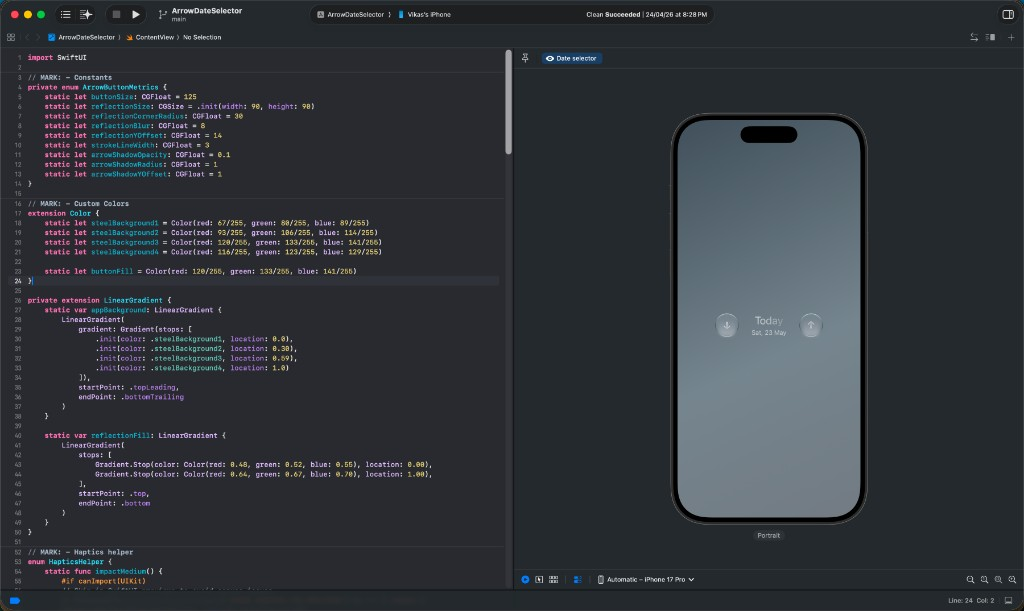
SwiftUI · Part 2
The same layers as code: metrics, gradients, reflection and motion, with the full source.
SwiftUI walkthrough
Two Swift files, smart labels like Today and Tomorrow, haptics and accessibility.
Rive · SwiftUIIn progress
Touch-driven balloons scripted in Rive and running natively inside a SwiftUI app.
SwiftUI · Open source
A SwiftUI YouTube clone that started as a Lottie splash experiment — then grew into home, Shorts, create sheet, and profile chrome, measured in Figma and filled with real portfolio motion.
SwiftUI · Open source
A Pinterest-style SwiftUI app that began as a Figma-to-code exercise and shipped as a native prototype — masonry grid, pin-to-detail motion, Rive splash, real haptics.
Design engineering is designing an interface and building it in code yourself, so nothing gets lost between the design and the app people use.
designengineer.ing is a set of exercises in that practice: design something from scratch, then build it in SwiftUI, with every decision that makes it feel right on a phone. Start with the glass button design breakdown and the SwiftUI engineering breakdown, or open-source playground apps like YouTube and Pinterest.
More on design engineering